Tesla Dashcam and Sentry Mode Evidence After a Collision: How to Preserve the Footage That Supports Your Claim
Updated September 15, 2026
RVCCR is a Tesla-certified collision repair facility serving Redlands and the Inland Empire, with collision, paint, mechanical, and EV repair handled under one roof. Our technicians use manufacturer repair information, document damage carefully, and coordinate with major insurance carriers. For Tesla owners, that process may begin before the vehicle reaches a repair facility: by preserving the Dashcam and Sentry Mode footage that records what happened.
A Tesla collision can create several different evidence questions at once. What happened immediately before impact? Which vehicle moved first? Was the Tesla stationary, changing lanes, braking, or proceeding through an intersection? Did the impact cause a specific warning, movement, or visible damage? What did the scene look like before vehicles were moved?
Dashcam and Sentry Mode footage may help answer some of those questions, but only if the recordings are saved before they are overwritten, copied without alteration, and presented alongside photographs, witness information, the police report, and a professional damage assessment. Footage can support a claim; it does not automatically determine fault or replace a complete investigation…
Why Tesla Dashcam and Sentry Mode footage can matter
Tesla’s Dashcam and Sentry Mode systems serve different purposes.
Dashcam records driving-related video when enabled and configured with compatible storage. Depending on the vehicle, software version, and selected settings, Dashcam may record continuously, allow manual saving, or save a recent segment when the driver honks the horn.
Sentry Mode is a security feature that monitors the vehicle while it is parked. When the system detects a security event, it can save related footage to the connected USB drive. Tesla’s Owner’s Manual states that Dashcam must be enabled for Sentry Mode to operate.
The resulting video may provide useful context about:
- Vehicle positions before impact
- Traffic movement and lane placement
- The approach of another vehicle
- A rear-end, side-impact, or parking-lot event
- The immediate aftermath of contact
- A person approaching or leaving a parked Tesla
- Damage that was not present before the vehicle was parked
- Environmental conditions visible from the camera perspective
That context can be helpful to an insurer, law enforcement agency, attorney, or collision repair facility. It may also help separate damage from the current incident from older damage that was already present.
However, video has limits. A camera may not capture every angle. It may not show a vehicle hidden behind another vehicle, a road surface defect, a signal phase, or activity outside its field of view. A clip may also lack reliable audio, precise location data, or enough perspective to establish speed. Treat footage as one part of the evidence file: not as an automatic answer.
What to do immediately after a Tesla collision
Safety and medical needs come before evidence preservation. The California Department of Insurance advises drivers involved in a collision to stop, call for help when necessary, exchange information, collect witness details, photograph the scene, and notify the insurance company.
Use this order of priorities:
- Check for injuries. Call 911 when emergency assistance is needed.
- Move away from immediate danger if it is safe. Do not put yourself in traffic to retrieve a device or photograph damage.
- Contact law enforcement when appropriate. Follow the responding officer’s instructions.
- Exchange information. Record names, contact information, driver’s license details, license plate numbers, vehicle identification numbers, and insurance information as available.
- Photograph the scene. Capture vehicle positions, roadway conditions, signs, lane markings, traffic controls, debris, visible damage, and surrounding context.
- Identify witnesses. Ask for names and contact details rather than relying on memory.
- Preserve Tesla footage. Save the relevant Dashcam or Sentry Mode clip as soon as it is safe.
- Notify your insurer. Provide a factual account and explain that video evidence is available.
- Arrange a professional inspection. A vehicle that appears drivable may still have hidden structural, suspension, sensor, restraint-system, or battery-related damage.
Do not stand in a travel lane to operate the touchscreen. Do not try to remove a USB drive while driving. If you are shaken, injured, or uncertain about the vehicle’s condition, ask another person to help only when it is safe.
How Tesla Dashcam saving works
Tesla’s Owner’s Manual describes several Dashcam saving methods. The exact menu names and behavior can vary by model and software version, so use the manual for your specific Tesla.
Manual saving
When Dashcam is enabled and the vehicle is configured correctly, the touchscreen Dashcam control can be used to save a clip. This is useful when you recognize that an event has occurred but did not use the horn.
For example, a driver might notice contact with another vehicle, see a dangerous maneuver, or reach a safe location after an incident and manually save the relevant recording. The key is to save promptly. Unsaved rolling footage may be erased as new footage is recorded.
Save on honk
Tesla manuals describe an On Honk or Save Clips on Honk setting. When enabled, pressing the horn saves the most recent ten minutes of Dashcam footage to the USB drive.
This setting can be valuable during an unexpected collision because the driver may not have time to touch the screen. It should be configured before a crash, not after. If you routinely drive with Dashcam enabled, review whether the horn-saving function is active and whether the vehicle recognizes the storage device.
Do not assume that a horn press saved footage unless you verify the file on the USB drive. A missing, incompatible, improperly formatted, full, disconnected, or damaged drive can prevent recording or saving.
Saved events
Sentry Mode can save an event clip when the parked vehicle detects an event. The Tesla touchscreen may display an alert indicating that a Sentry event occurred. Save and copy the footage promptly, especially if the vehicle remains parked and continues generating new recordings.
The relevant clip may include more than the exact moment of impact. Preserve the surrounding time period when possible. A longer sequence can show the vehicle approaching, the event itself, and what happened immediately afterward.

Setting up the USB drive correctly
Tesla’s Owner’s Manual explains that Dashcam and Sentry Mode require compatible USB storage and the appropriate TeslaCam folder structure. Depending on the vehicle and software version, Tesla lists supported file systems such as exFAT, MS-DOS FAT for Mac, ext3, or ext4. NTFS is not supported in the referenced manual instructions.
Some Tesla vehicles can format a USB drive from the touchscreen. The manual describes using the vehicle’s safety settings to format the drive and create the required folders. If formatting on a computer, follow Tesla’s current instructions for creating the TeslaCam folder at the base level of the drive.
Important points include:
- Use a compatible, properly formatted USB drive.
- Confirm that the TeslaCam folder is set up correctly.
- Use a vehicle port that supports data recording, not a charging-only port.
- Verify that the Dashcam and Sentry Mode indicators appear as expected.
- Check the drive periodically to confirm that recordings are actually being created.
- Keep a second storage device available for copying evidence after an incident.
A drive that works for charging is not automatically suitable for video recording. A drive that was formatted for another purpose may also fail to record. Before relying on the system, test it while parked in a safe location and confirm that the saved video opens on a computer.
What gets overwritten
This is one of the most important parts of Tesla footage preservation.
Continuous, unsaved Dashcam video operates as a rolling recording. As new video is created and available storage is used, older unsaved material can be overwritten. Tesla’s Owner’s Manual warns that desired footage must be saved for later viewing; otherwise, it may be erased and overwritten.
That means you should not wait several days before checking the drive. Continuing to drive, park, and record may reduce the chance of recovering the relevant moment.
A practical preservation sequence is:
- Stop using the original USB drive for routine recording when safe.
- Remove it only when the vehicle is parked and powered appropriately.
- Connect it to a computer using a reliable adapter if needed.
- Copy the entire TeslaCam folder to a new evidence directory.
- Make a second copy on separate storage.
- Keep the original drive unchanged.
- Do not rename, trim, filter, enhance, or export over the original files.
- Record the date, time, vehicle, location, and file-copy steps in your notes.
Saved clips are different from the rolling buffer, but you should still copy them promptly. Files can be deleted accidentally, storage can become full, and a device can fail. Preserving a file means creating a duplicate while retaining the original.
How to preserve the footage without damaging its credibility
Insurance claims do not usually depend on a dramatic presentation. They depend on clear, organized, verifiable information.
When copying video, preserve:
- The original file
- The original folder structure
- The file name
- The creation or modification information shown by the operating system
- The USB drive itself
- A copy on a separate device
- Notes identifying who copied the files and when
- A written description of what each clip appears to show
Avoid editing the original. If you need to create a shorter version for easier review, keep the unedited original and clearly label the shortened copy as an excerpt. Do not apply filters, add captions to the footage itself, change the speed, or remove sections without explaining what you did.
If you take screenshots from a clip, keep the video file too. A screenshot can highlight a moment, but it does not preserve motion, sequence, timing, or the surrounding context.
A simple evidence log may look like this:
| Item | Description |
|---|---|
| Vehicle | Tesla model and vehicle identification number |
| Incident date | Date and approximate time |
| Location | Street, parking lot, or roadway |
| Original device | USB drive used in the Tesla |
| File copied | Original file name |
| Copy date | Date and time copied |
| Storage locations | Laptop, external drive, secure cloud folder |
| Notes | Neutral description of what the clip appears to show |
The purpose is not to create a courtroom-style chain of custody for every ordinary claim. The purpose is to avoid confusion and demonstrate that the file was preserved responsibly.
Use the footage with other accident documentation
Video is strongest when it agrees with other evidence.
Compare the footage with:
- Scene photographs
- Vehicle damage photographs
- The police report
- Witness information
- Driver statements
- Roadway and traffic-control photographs
- The insurance claim description
- Vehicle telematics or app information, when available
- The repair estimate and supplements
- A professional inspection
Do not assume that a video alone proves the full cause of damage. A clip may show contact but not explain hidden damage behind a bumper. It may show one impact while a vehicle has damage from multiple events. It may establish that a car was parked, but not show when every scratch occurred.
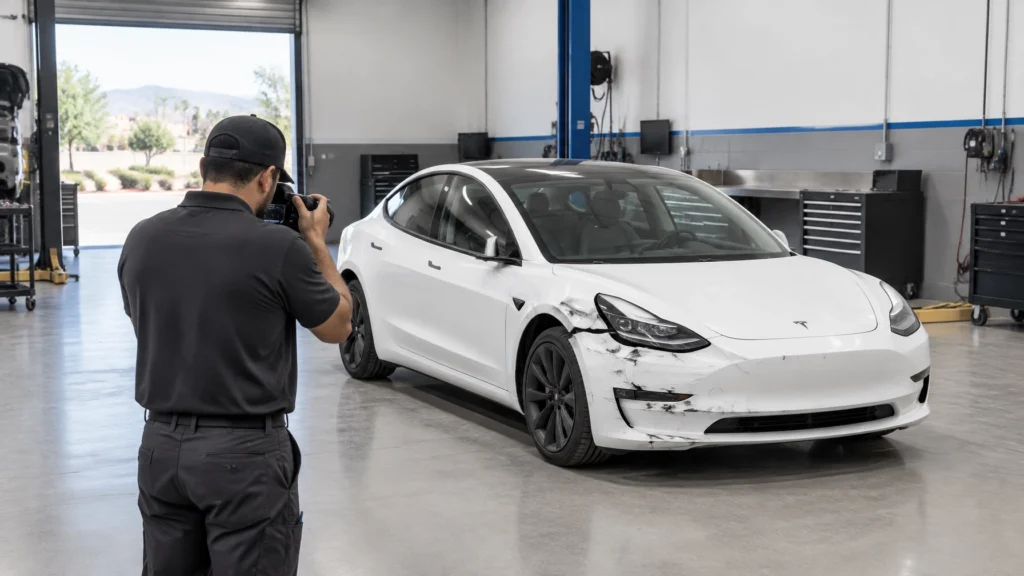
This is where repair documentation becomes important. A collision repair facility can photograph the vehicle at intake, note pre-existing damage, document teardown findings, and connect visible damage to the repair plan. Tesla’s collision guidance emphasizes the importance of appropriate repair procedures and qualified repair facilities for collision work.
At RVCCR, our repair process can use available footage as one source of context during intake. It may help us understand the direction of an impact, identify the likely contact area, compare the vehicle’s condition before and after an event, or explain why damage may extend beyond the most obvious panel. It does not replace measurement, scanning, disassembly, or Tesla-specific repair information.

How a repair shop may use Sentry footage during damage assessment
A repair shop should not treat Sentry Mode video as a substitute for an inspection. It can, however, help establish a useful timeline.
For example, footage may show:
- The Tesla parked without visible damage
- Another vehicle entering the frame
- Contact with a bumper, fender, door, or quarter panel
- A person inspecting the vehicle after impact
- A second event occurring later
- A location where debris or another object contacted the vehicle
- A difference between the vehicle’s pre-event and post-event condition
A technician or estimator may compare the video with intake photographs and the physical damage. If the video shows a low-speed contact at the rear corner but the vehicle has unrelated damage on the opposite side, that distinction may matter for the estimate and claim documentation.
Footage may also help the shop ask better questions:
- Is the reported impact consistent with the visible damage?
- Could the event have affected a sensor mount or camera?
- Does the scene suggest underbody or wheel contact?
- Does the video show a secondary impact?
- Is there evidence that damage existed before the reported loss?
- Should the vehicle receive a more complete inspection before teardown?
The repair plan still depends on physical evidence. Modern Teslas may require attention to structural components, high-voltage safety, restraint systems, cameras, sensor mounts, suspension, cooling components, and battery-adjacent areas. A video can help explain the event; it cannot certify the condition of those systems.
For a deeper explanation of why Tesla repairs require manufacturer-specific procedures, see our article on Tesla-certified collision center standards and EV structural safety.
Submitting footage to an insurer
When providing video to an insurance company, start with a short factual explanation. Avoid overstating what the footage proves.
A useful submission may include:
- The original or unaltered copy, when requested
- A clearly labeled duplicate for routine review
- The date and approximate time of the event
- The location
- A description of the camera view
- A statement explaining whether the file came from Dashcam or Sentry Mode
- Related photographs
- The police report number, if available
- Contact information for the repair facility handling the inspection
Use neutral language such as:
“This clip was saved from the Tesla’s USB drive after the collision. It shows the vehicle parked at the reported location and an impact involving the rear passenger-side area. The physical damage remains subject to inspection.”
Avoid statements such as “This proves the other driver caused every part of the damage” unless that conclusion has been established by the appropriate investigation.
Ask the insurer how it wants large files delivered. Email attachments may compress or reject video. A secure upload portal may be preferable. Do not send the only copy of the original drive or delete the footage after uploading it.
If the insurer disputes the relevance of the video, keep the file and provide it to your repair facility, attorney, or other appropriate professional for review. If the claim becomes legally contested, consult a qualified attorney about evidence handling and disclosure.
California privacy and audio considerations
California Penal Code section 632 addresses intentionally using an electronic amplifying or recording device to eavesdrop on or record a confidential communication without the consent of all parties. The statute defines a confidential communication by reference to circumstances in which a participant may reasonably expect the communication to be confined to the parties. It also addresses the use of unlawfully obtained recordings in proceedings.
This creates an important distinction: a silent exterior video of traffic is not the same legal question as an audio recording of a private conversation. A Tesla may capture sound depending on the recording mode, vehicle, software, and settings. You should not assume that every audio track can be freely shared or used in every context.
Practical precautions include:
- Do not intentionally record private conversations unrelated to the collision.
- Do not publish footage containing identifiable people simply to draw attention online.
- Consider whether the clip includes audio before sharing it.
- Preserve the original, but ask a lawyer about redacting or separating audio if privacy is a concern.
- Avoid posting the footage on social media while an insurance or legal matter is active.
- If the event involves a dispute over recording consent, obtain legal advice.
This article is general information, not legal advice. Penal Code section 632 is specific to confidential communications and does not mean that every vehicle recording is automatically unlawful or automatically admissible. The facts matter, including what was recorded, where it was recorded, whether audio was captured, what the participants could reasonably expect, and how the file was obtained.
For the statute’s exact language, review California Penal Code section 632.
Limits of Tesla Dashcam and Sentry Mode evidence
Tesla footage can be helpful, but it is not perfect. Common limitations include:
Limited field of view
Cameras record only what they can see. A vehicle may enter from outside the frame. A camera may face forward while the relevant contact occurs behind the Tesla. Parked vehicles, trees, walls, darkness, rain, glare, or other traffic can block important details.
Unclear timing
The file’s timestamp may not answer every timing question. Software settings, time-zone configuration, file metadata, and the difference between recording time and copying time can create confusion. Preserve the original information and explain the approximate time rather than guessing.
Insufficient perspective
Video may show movement without making speed or distance obvious. A wide-angle camera can distort perspective. A clip may support a sequence of events without proving every detail of vehicle dynamics.
Missing or overwritten footage
If the event was not saved, the rolling recording may be overwritten. A Sentry alert does not guarantee that every moment before and after the event is available. Check the drive promptly.
Camera or vehicle damage
A collision may disable a camera, interrupt recording, damage the USB drive, or prevent the vehicle from saving footage. A missing recording does not by itself establish that no event occurred.
No physical damage analysis
Video cannot reveal all hidden damage. A vehicle may appear to experience a minor contact while the inspection identifies damage to brackets, sensors, suspension, cooling components, restraint systems, or other parts.
Conflicting evidence
Witness statements, photographs, police documentation, and video may not agree. Do not edit the file to make it match another account. Preserve the disagreement and let the appropriate professionals evaluate it.
Our companion article on choosing an EV repair shop near me explains why Tesla and other EV collision repairs require more than ordinary cosmetic work.
Questions to ask a certified Tesla collision facility
When you bring your vehicle and footage to a repair facility, ask:
- Can you preserve the USB drive and return the original files unchanged?
- Will you photograph the vehicle before repair work begins?
- Will you perform a complete damage assessment rather than relying only on the video?
- How will you identify hidden damage after disassembly?
- Which Tesla repair procedures apply to this damage?
- Will the vehicle receive the required diagnostic scans and calibrations?
- How will you document supplements for the insurer?
- Will you separate pre-existing damage from the reported loss?
- Will you explain which footage supports the physical findings and which questions remain unanswered?
- Do you provide a written warranty for the completed repair?
A trustworthy shop should welcome clear evidence while remaining objective about what the evidence does and does not show.
RVCCR combines Tesla/EV collision repair with paint and mechanical services. We use a documented repair process, coordinate with insurance carriers, and restore vehicles according to applicable manufacturer information. Our Redlands facility serves Tesla owners throughout the Inland Empire.
For broader claim preparation, read our article on certified auto collision repair in Redlands.
A practical preservation checklist
Keep this checklist with your insurance information:
- Confirm everyone is safe.
- Call 911 when injuries or hazards require emergency assistance.
- Photograph the scene when safe.
- Collect driver and witness information.
- Save Dashcam footage manually or by using the configured horn-saving function.
- Check for Sentry Mode event clips.
- Stop routine recording on the original USB drive.
- Copy the entire relevant folder without editing.
- Make a second backup.
- Preserve the original USB drive.
- Write down the incident date, location, and file names.
- Note whether audio is present.
- Share footage through a secure insurer or repair-shop channel.
- Avoid social-media publication.
- Arrange a professional Tesla collision inspection.
- Keep photographs, estimates, supplements, and repair documentation together.
Get your Tesla back to the road ahead
A collision interrupts more than transportation. It can disrupt work, school, family plans, and the trips you had already made. Preserving Dashcam and Sentry Mode footage gives you a better chance to explain what happened, but the next step is equally important: have the vehicle inspected and repaired by a facility that understands Tesla construction, EV safety, repair procedures, diagnostics, refinishing, and insurance documentation.
RVCCR helps Tesla and EV owners in Redlands and the Inland Empire move from uncertainty to a documented repair plan. We assess the physical damage, coordinate with insurance, use certified repair processes, and support the final restoration with a written lifetime warranty.
If your Tesla was involved in a collision, start a free photo estimate. Send clear photos, your vehicle information, and any relevant footage details so our team can help determine the next step.
Preserve the evidence. Document the damage. Choose certified repair. Then let your Tesla move forward: safely, confidently, and ready for the next adventure.
Sources and additional reading
Need a repair estimate?
Skip the wait — send us a few photos and our team will get back to you fast.
Start a Photo Estimate →